DIRECTV Error Code 721
This error might be caused by one of the following situations:
- The channel you’re trying to watch is not included in your programming package.
- Your receiver is not processing the programming information on this channel.
Solution 1: Refresh your service
Still seeing Error Code 721 on your TV screen? Try Solution 2.
Solution 2: Check your channel lineup
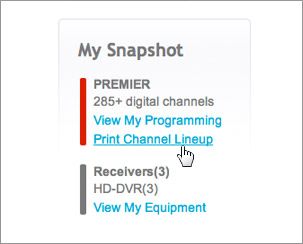
STEP 1: Sign in to your DIRECTV online account.
STEP 2: On the My Overview page, click Print Channel Lineup.
STEP 3: If the channel you’re trying to watch is not included in your programming package, click Change Package to easily upgrade your package.
Still seeing Error Code 721 on your TV screen? Try Solution 3.
Solution 3: Reset your receiver
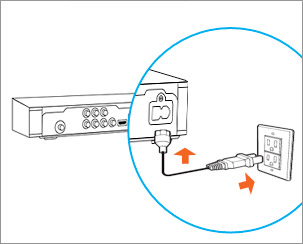
STEP 1: Unplug your receiver’s power cord from the electrical outlet, wait for 15 seconds, and plug it back in.
STEP 2: Press the Power button on the front panel of your receiver. Wait for your receiver to reboot.
STEP 3: Go to My Equipment to refresh your receiver again.
Still seeing Error Code 721 on your TV screen? Please call 1-800-531-5000 for assistance.