What is SAP and how does it work?
Your DIRECTV service includes SAP (Secondary Audio Programming), which allows you to enjoy English-language programming in several different languages. The language you select on-screen will become the default language for all of your programming and will activate automatically whenever SAP is available.
If you have a Standard receiver or a DVR: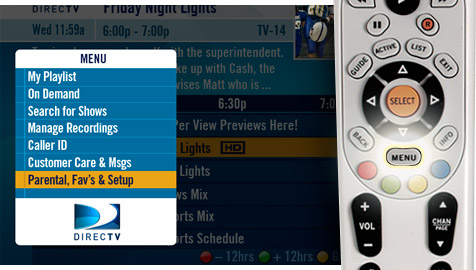 1. Press MENU on your DIRECTV remote control
2. Select PARENTAL, FAV’S & SETUP
3. Select SYSTEM SET-UP
4. Select AUDIO
5. Choose LANGUAGE and select your language of choice
If you have an HD receiver or an HD DVR:
1. Press MENU on your DIRECTV remote control
2. Select PARENTAL, FAV’S & SETUP
3. Select SYSTEM SET-UP
4. Select AUDIO
5. Choose LANGUAGE and select your language of choice
If you have an HD receiver or an HD DVR:
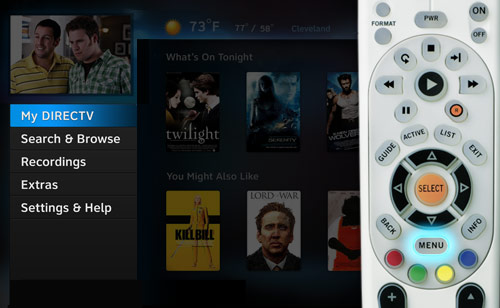 1. Press MENU on your DIRECTV remote control
2. Select SETTINGS & HELP
3. Select SETTINGS
4. Select AUDIO
5. Choose LANGUAGE and select your preferred language
24-hour SAP channels include Boomerang, Disney XD and Cartoon Network. Many of the movies on DIRECTV CINEMA™ have the SAP functionality. Many of DIRECTV’s premium channels also offer shows and movies with SAP (see below for complete list). Other channels offer SAP on a show-by-show basis. If a particular program is SAP enabled, it will be indicated in the program description that appears on the channel guide. To use the SAP function, press the GREEN button on your remote control.
Premium Movie channels with SAP:
HBO East
HBO 2 East
HBO Signature
HBO West HD
HBO West
HBO 2 West
HBO Family East
HBO Family West
Cinemax East
Cinemax West
More MAX
starz East
starz West
starz Edge
starz in Black
Encore East
Encore West
Encore WAM
Showtime East
Showtime West
SHO 2
Showtime Showcase
Showtime Extreme
1. Press MENU on your DIRECTV remote control
2. Select SETTINGS & HELP
3. Select SETTINGS
4. Select AUDIO
5. Choose LANGUAGE and select your preferred language
24-hour SAP channels include Boomerang, Disney XD and Cartoon Network. Many of the movies on DIRECTV CINEMA™ have the SAP functionality. Many of DIRECTV’s premium channels also offer shows and movies with SAP (see below for complete list). Other channels offer SAP on a show-by-show basis. If a particular program is SAP enabled, it will be indicated in the program description that appears on the channel guide. To use the SAP function, press the GREEN button on your remote control.
Premium Movie channels with SAP:
HBO East
HBO 2 East
HBO Signature
HBO West HD
HBO West
HBO 2 West
HBO Family East
HBO Family West
Cinemax East
Cinemax West
More MAX
starz East
starz West
starz Edge
starz in Black
Encore East
Encore West
Encore WAM
Showtime East
Showtime West
SHO 2
Showtime Showcase
Showtime Extreme